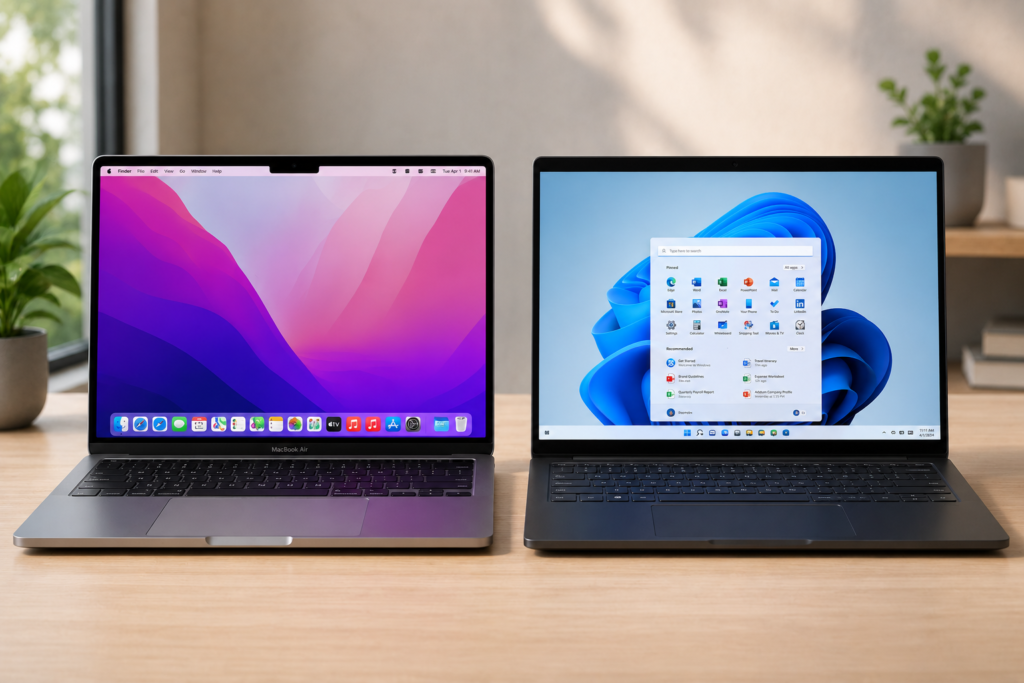
It’s the oldest question in computing, and the honest answer isn’t “Mac” or “Windows” — it’s “depends on you.” We compare Mac prices for a living, so you might expect us to wave the Apple flag. We’re not going to. For a lot of people a Windows machine is the smarter buy, and for others a Mac is worth every rand. Here’s how to figure out which one you are, without the fanboy noise.
The short answer
Buy a Mac if you want a machine that’s simple, secure, beautifully built, brilliant with iPhones, and you’re happy to pay more upfront for something that stays smooth for years. Buy Windows if you want maximum choice and value for money, you game, you need specific software, or you simply want to spend less. Neither is “better” — they’re built for different priorities.
Where Windows wins
Value for money, full stop. This is the big one in South Africa. Rand-for-rand, Windows gives you far more machine. You can get a genuinely capable Windows laptop for R8,000–R12,000 — a price where Apple only just arrives with the entry MacBook Neo. If your budget is tight and you need a real computer for work or studies, Windows simply stretches further.
Endless choice. Hundreds of models from dozens of brands — touchscreens, 2-in-1s that fold into tablets, gaming rigs, ultralight travel laptops, big-screen desktops. Whatever shape, size or price you need, something fits. Macs come in a handful of variations; Windows comes in a thousand.
Gaming. If you play PC games, it’s not really a contest. The vast majority of games are built for Windows, and you can buy or build a Windows machine with a serious graphics card for the price of a mid-range Mac. Macs have improved here, but for gaming, Windows is home.
Specific and specialised software. Plenty of essential programs — certain accounting packages, engineering and CAD tools, niche business or government software, some banking utilities — are Windows-only. If your job or course requires a particular app, check what it runs on before anything else. This single point overrides every other argument.
Upgrades and repairs. Many Windows laptops and most desktops let you add RAM or swap storage later, and they’re generally cheaper and easier to get repaired. Macs are essentially fixed at purchase — what you buy is what you keep.

Where Mac wins
It just works — and keeps working. macOS is famously smooth and low-fuss: fewer viruses, fewer mysterious slowdowns, fewer “why is it doing that” moments. Macs also tend to stay fast for years rather than bogging down, and Apple supports them with updates for a long time. You pay more upfront, but the machine often lasts longer.
Build quality and the screen. Even Apple’s cheapest laptops are aluminium, solid, and beautifully finished, with displays that are consistently excellent. In the Windows world you can match this — but usually only at the premium end, where the price gap to a Mac narrows anyway.
The Apple ecosystem. This is the quiet dealmaker. If you own an iPhone, a Mac is magic: messages and calls on your laptop, copy on the phone and paste on the Mac, AirDrop files in seconds, photos everywhere automatically. If your world is already Apple, a Mac slots in like the missing piece. (If you’re an Android-and-Windows person, this advantage mostly disappears.)
Resale value. Macs hold their value remarkably well. A three-year-old MacBook still sells for a meaningful chunk of what you paid; most Windows laptops depreciate much faster. The higher sticker price stings less when you remember what you’ll get back.
Battery and silence. Apple’s M-series (and the new A18 Pro) chips run cool, quiet and long. All-day battery and fanless silence are the norm, not the premium option.
Match it to who you are
The student. If your course names required software, that decision is made for you — check first. Otherwise it’s budget vs longevity: Windows gets you more for less right now; a Mac (especially the Neo or an Air) costs more but tends to last all the way through and sell well after. Both are excellent study machines.
The home / everyday user. Browsing, email, streaming, admin, video calls — both do this perfectly, so let price and ecosystem decide. iPhone owner who wants simple? Lean Mac. Want to spend the least for something that does the job? Lean Windows.
The office / business user. Follow your company’s software and IT setup. Many businesses run Windows-based systems, so a Mac can mean friction. Self-employed or flexible? Either works — pick on preference and budget.
The creative. Photo, video, music and design all run beautifully on Mac, which is why so many creatives use them — but modern Windows machines are entirely capable too. Often comes down to which apps you already know.
The gamer. Windows. Easy.
The South African reality check
Two local factors worth weighing. First, price: import costs and the rand mean Macs feel especially pricey here, so the value gap with Windows is wider than overseas — that matters more on a tight budget. Second, repairs and support: Windows machines are generally cheaper and easier to service locally, while Mac repairs usually mean an Apple-authorised route that can cost more. Neither changes the verdict, but both deserve a place in your sum.
The bottom line
There’s no universal winner — only the right fit for you. Want maximum value, choice, gaming, or specific software? Windows. Want simplicity, build quality, long life, great resale, and you’re in the Apple/iPhone world? Mac. Be honest about your budget, your software, and which phone is in your pocket, and the answer usually picks itself.
If you land on a Mac, the next job is making sure you don’t overpay — which is exactly what we’re here for. Compare today’s best Mac prices across SA retailers →
And if you’re still deciding which Mac, these help: Which MacBook should you buy? · Is the MacBook Neo worth it? · Why buy a Mac mini?
Prices and availability change often — always confirm the final price with the retailer before buying.